
TAKE ACTION
Sync partner data to your systems
You have run co-sell plays and your reps are getting introductions. The next step is giving your broader sales, marketing, and customer success teams visibility into that same partner data, wherever they already work, whether that is your CRM or your own BI and reporting tools.
This article covers four ways to get partner data into your systems.
The Salesforce Managed Package
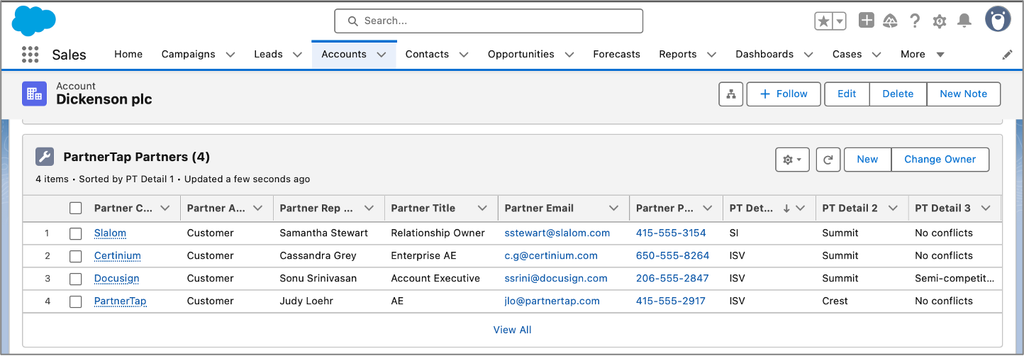
The Managed Package is a pre-built Salesforce integration that adds a partner contact related list to each of your Salesforce account records. Once installed, any rep looking at an account in Salesforce can see which partner reps are mapped to that account and how to reach them, without leaving Salesforce.
What reps see on each account record:
- Partner company name
- Partner rep name
- Partner rep title
- Partner rep email
- Three configurable detail fields (PT Details 1, 2, and 3) that your team can map to additional data from PartnerTap
What the Managed Package installs in Salesforce:
- 1 custom object (the partner contact related list on the Accounts object)
- 11 custom reports, accessible by searching “PartnerTap” in Salesforce Reports.
- 1 dashboard covering Potential New Logos, pipeline, and mapped accounts
A note on multiple rows per account: If a partner shares more than one contact type for the same account, that account will appear more than once in the related list: one row per contact type. This is expected behavior, not a duplicate.
How to get it: The Managed Package is an add-on, purchased separately from the PartnerTap platform. Once you have connected partners that are syncing real-time CRM data with you, your Salesforce Administrator can install it. Contact support@partnertap.com or your Customer Success Manager to request it.
Note: The Managed Package is available for Salesforce only. If your team uses a different CRM, the API or Data Lake Exporter options below may be a better fit.
The PartnerTap API
The PartnerTap Analytics API lets your team pull any PartnerTap report as a CSV or via an API call. This option works for teams that need custom data flows, account-level field updates, or integration with systems beyond Salesforce.
The API exports data out of PartnerTap. Your developer uses that data to update fields in your CRM or other systems on whatever schedule fits your needs: daily, weekly, or monthly.
Your team can generate API keys directly in the Admin Center under Data > API Keys.
The API is an add-on product. Contact support@partnertap.com to discuss it.
Link partner organizations to your CRM
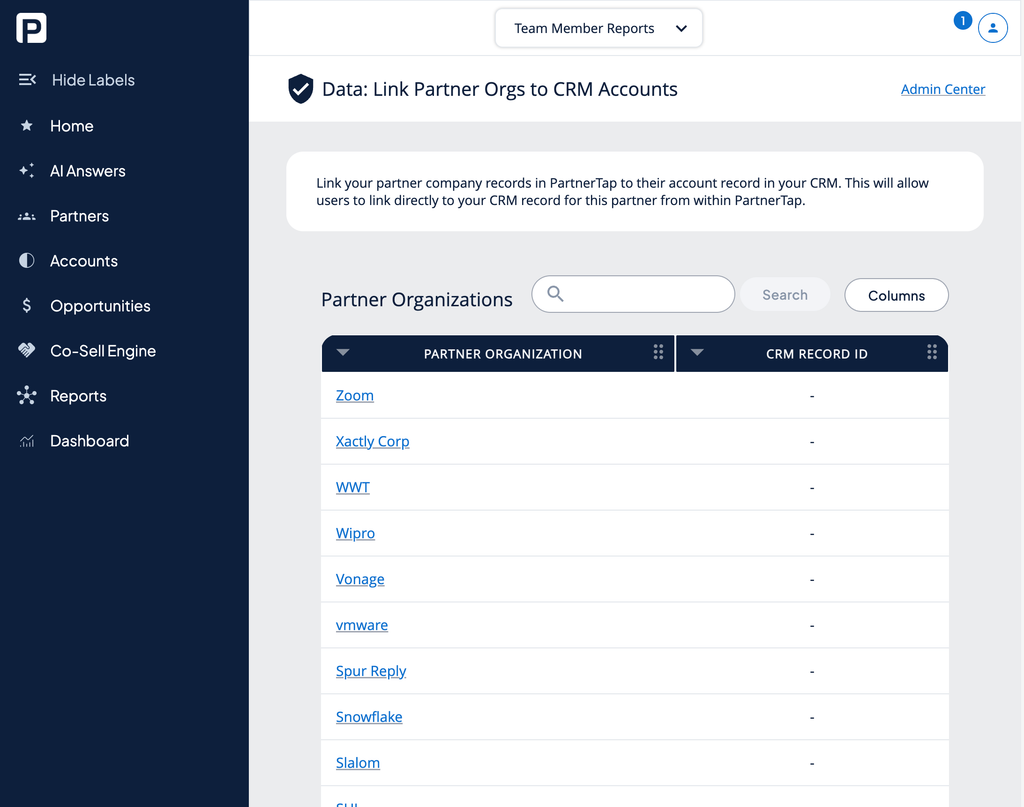
This is a free feature available to all PartnerTap users. It lets you connect each partner company in PartnerTap to their corresponding account record in your CRM. Once linked, anyone on your team can click directly from a partner’s page in PartnerTap to their Salesforce account record, without manually searching across tabs.
- Click Admin Center at the bottom of the left sidebar.
- Under Data, click Link to CRM.
- A table shows your Partner Organizations with a CRM Record ID column. Each row has an empty field for the partner’s Salesforce Account ID.
- Enter the Salesforce Account ID for each partner you want to link.
The Data Lake Exporter
If your sellers work primarily in BI tools like Tableau or Power BI rather than in Salesforce, the Data Lake Exporter gets your partner intelligence there directly.
- What it does: exports PartnerTap’s partner intelligence and matches results into your own data lake or cloud platform (S3, a warehouse, or another cloud platform of your choice). From there, it flows into whatever BI tool or reporting model your team already uses.
- Why it’s different from the other options above: the Data Lake Exporter has no CRM dependency at all. There is nothing to install in Salesforce and nothing to submit for a Salesforce security review.
- Access and governance: once your data is in your lake, access is controlled entirely by the permissions you already have set on your lake and BI layer, not by PartnerTap.
- Best fit: use this option when your analytics team owns the reporting surface, or when your CRM is not where your sellers actually look for account information.
Note: these options are not mutually exclusive. A team with sellers working across both Salesforce and BI tools can use more than one option at the same time. Please contact us at success@partnertap.com (opens in a new tab) for assistance.
Want to scale?
See the leading multi-partner co-selling platform.
Invited by a partner?
Sign up for a free PartnerTap account.