
View multi-partner ecosystem reports
As you and your team grow your connected partner networks and continue to add offline partner data, you build up a valuable multi-partner view of each customer and prospect. Our set of 10 Ecosystem reports (opens in a new tab) provide an aggregated view of data across your partner ecosystem. Within this set of reports you can see multi-partner views of account overlap, opportunity and pipeline data, as well as summary views of user engagement and all partner connections.
These ecosystem-wide views provide valuable insights for multiple teams. Channel and Business Managers can get a macro view of all partners engaged on each account to understand who else is influencing customers and prospects. Sellers can find partners with existing customer relationships on accounts they need to come up to speed on. Marketing can identify opportunities to run campaigns to prospects or customers about partners they have strong value propositions with.
Any reports you save or download are also accessible from Saved Reports and Download Reports in the Reports sub-navigation.
View your ecosystem reports
- Click Reports in the left sidebar.
- In the Reports sub-navigation, locate the Ecosystem tile and click View to open the Ecosystem Global Reports page.
- Click View on the tile of the report you want to open. The report loads in a pop-up window.
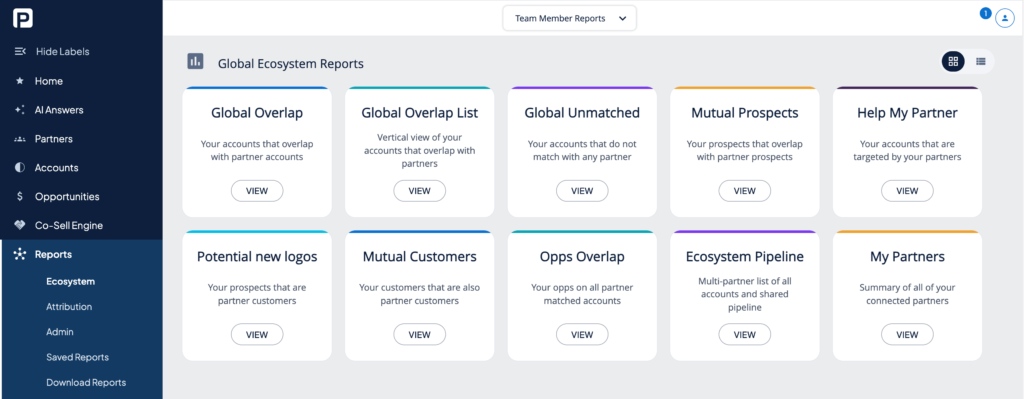
Within any ecosystem report you can:
- Reorder columns to get specific data side by side
- Sort by any column
- Hide columns from view
- Apply one or more filters (available filters are determined by the columns in your data set)
- Save your report (sorting and filters persist when you return; data refreshes with real-time mapping results)
- Download your report for further analysis in Excel or MCP.
Save your results
When you have filtered down to the accounts you want to act on, click the Save button and select Save results as an action list. Give your list a name and description, then click Save.
For next steps on using your Action List, see Create Action Lists (opens in a new tab).
Want to scale?
See the leading multi-partner co-selling platform.
Invited by a partner?
Sign up for a free PartnerTap account.