
Set opportunity share settings
Sharing opportunities with your partner via PartnerTap eliminates the need to send open opportunity details back and forth through spreadsheets and email. Opportunity sharing allows partners to track pipelines in real time, giving both sides better forecasting, a way to proactively help each other on active deals, and fewer calls for status updates.
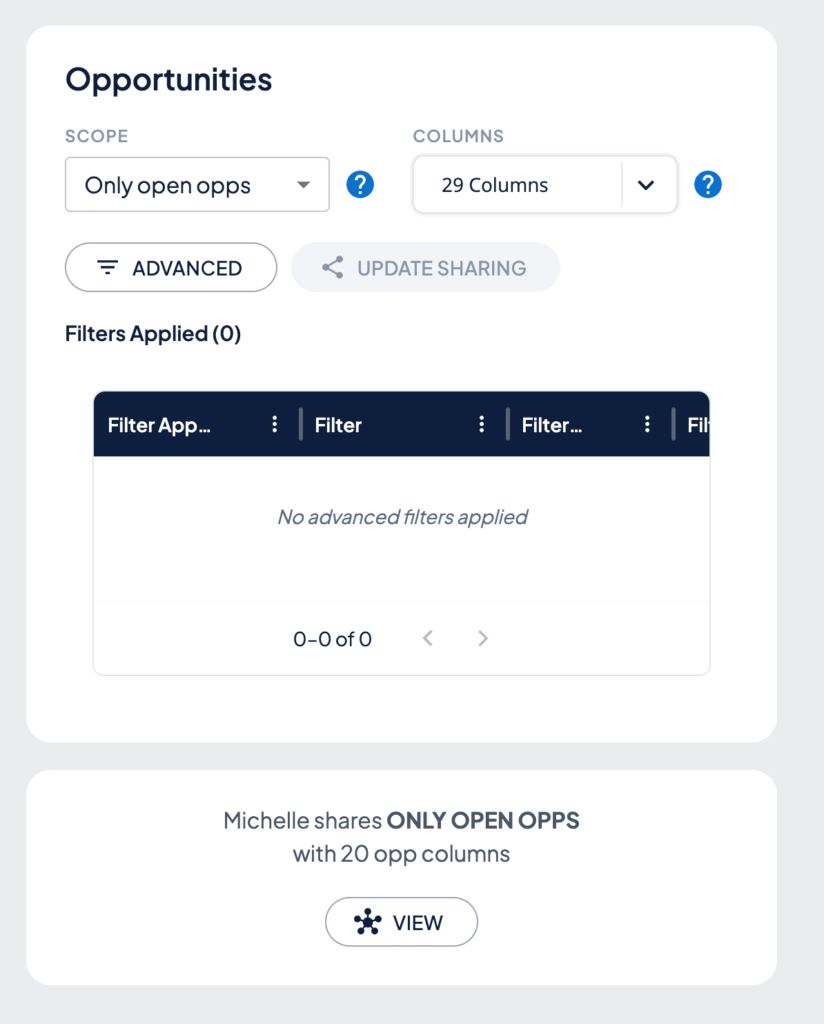
You have complete control over the exact opportunities and details you share with each partner. Opportunity share settings use three controls to define what you share.
How sharing rules work
Three controls define what a partner sees on your matched opportunities:
- Scope: Which opportunity records are visible. All opportunities, only open opportunities, only opportunities on matched accounts, and many more (opens in a new tab).
- Columns: Which fields on those opportunities are visible. Your administrator defines which columns may be shared with partners and you select from those options here.
- Filters: Optional conditions that narrow which records within your chosen scope are shared. For example, share only opportunities in a specific stage or above a certain probability to close.
These settings are per partner.
Set your opportunity scope
- Click Partners in the left sidebar, then click Connections.
- Find the partner you want to configure and click View on their tile.
- Click the Share sub-navigation tab.
- Under the Opportunities section, open the Scope dropdown and select the scope of opportunities you want to share.
- Click the question mark icon next to the Scope field for a full description of each option.
Choose which columns to share
Open the Columns dropdown in the Opportunities section and choose which fields your partner can see. Your administrator pre-defines which columns are available for sharing. You select from those approved options for each partner.
Apply custom filters
Click Advanced to narrow down which opportunities are shared within your chosen scope. Examples: opportunities tied to this partner, in a specific stage, or above a certain probability to close. Add as many filters as needed.
Save your settings
Click Update Sharing to apply your opportunity sharing rules to this partner.
Want to scale?
See the leading multi-partner co-selling platform.
Invited by a partner?
Sign up for a free PartnerTap account.