
Prepare your data
PartnerTap maps your accounts against your partners’ accounts to surface shared customers, open prospects, and pipeline opportunities. The more complete your base account data, the stronger your match results.
Choose your base account data method
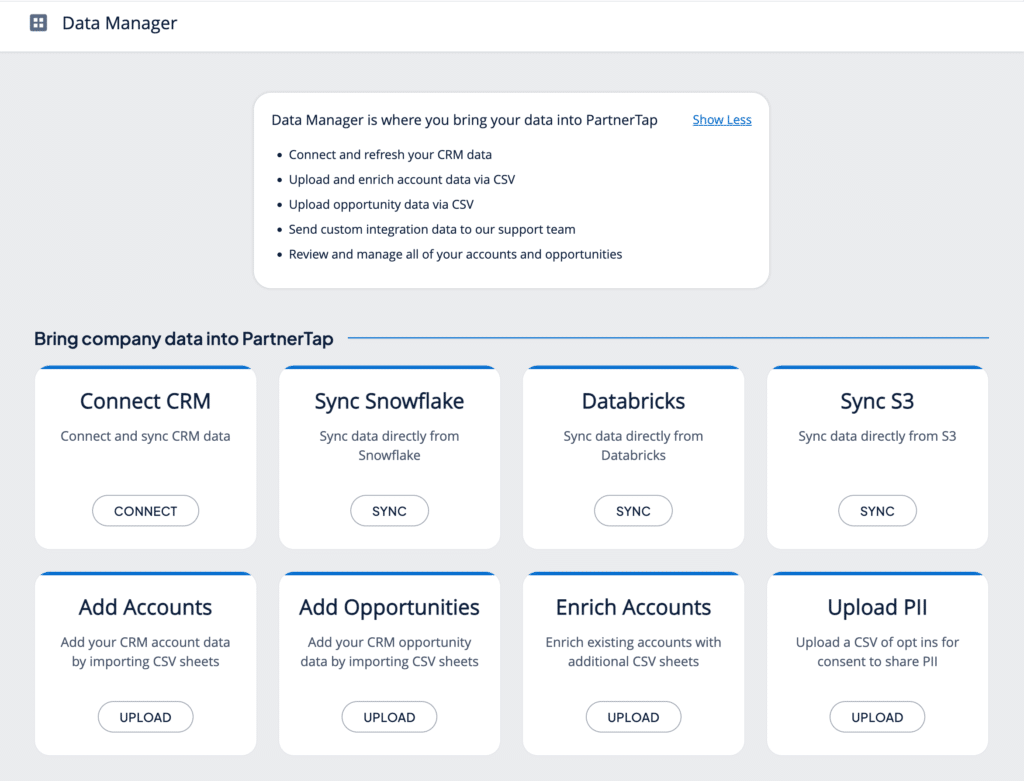
Click Data Manager in the left sidebar. This is where you bring your base account data into PartnerTap. There are several ways to get your account data in – choose the one that fits your setup:
- Connect CRM (recommended): Connect your CRM directly and your accounts and opportunities sync automatically. Supports Salesforce, HubSpot, and Microsoft Dynamics. See: Sync Your CRM (opens in a new tab).
Note: Salesforce organizations must install the PartnerTap ECA and create a dedicated integration user before syncing. See the Salesforce Data Sync Guide (opens in a new tab) for instructions. - Add Accounts / Add Opportunities (CSV Upload): Export your accounts from any source and upload as a .csv file if you are not ready to connect your CRM. See: Upload Data via CSV (opens in a new tab).
- Sync Snowflake, Databricks, or S3: PartnerTap supports data ingestion from Snowflake, Databricks, and Amazon S3 for teams with existing data pipelines. See the relevant setup guides: Snowflake (opens in a new tab) | Databricks (opens in a new tab).
What data to bring in
At minimum, every account record needs:
- Account Name
- Account Type (Customer or Prospect)
Adding the following improves match accuracy and enables co-sell plays:
- Website, DUNS Number, or CRM Account ID
- Account Owner Name and Account Owner Email
- City, State, Country
Opportunity data is optional but lets your partners see your active pipeline on matched accounts.
Note: PartnerTap does not accept contact or lead records. Account and opportunity data only.
What your partners can see
Bringing data into PartnerTap does not share it with anyone. Your base account data stays in your account until you explicitly configure sharing settings. You control which accounts and fields each partner can see.
Want to scale?
See the leading multi-partner co-selling platform.
Invited by a partner?
Sign up for a free PartnerTap account.